Vollbild ansehen
Tuning
vv19.2
BeamNG v0.39
@DaddelZeit
1h ago
Zeit's graphics
A powerful graphics managing utility, built in Beam.
mod_description
Notice: HDR may have spotty support. Please report the specific settings that affect it.
Featuring...
A profile manager for quick access, plug & play usage...
Direct access to vanilla settings and more via
comprehensive and custom-built UI...
Easy-share features:
Precise explanations of almost all variables:
Custom Post Effects & Anti-Aliasing options:
An in-depth photo tool supporting motion blur:
Direct Graphics Option Access
This mod's main aim is to provide direct control over individual settings within the game.
This means you have access to the following settings without intermediate stages:
- HDR/Bloom settings, notably:
- Color Correction
- Blue Shift
- Bloom Threshold
- Ambient Occlusion (SSAO) quality, radius and contrast
- Level of Detail scales for both terrain and mesh
- Material detail scales
- Reflection settings:
- Detail
- Distance
- Texture resolution
Custom Post Effects
- Contrast, Saturation & Vibrancy adjustments
- Vignette
- Visual Sharpness
- Film Grain
- Chromatic Abberation
- Letterbox (Black bars)
- Additional Anti-Aliasing
Management features
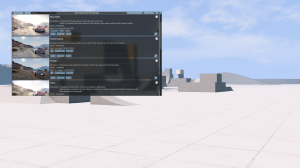
This mod also includes a Profile Manager intended to make sharing and switching presets/profiles as simple as possible.
Profiles can be given a display name, description, author, date, tags as well as a preview image.
Exports may come as a mod or as text copied into the system clipboard.
Screenshot tool
Alongside the Profile Manager a mentionable window is the Photo Tool.
Next to presets, this window allows configuration of screenshot settings:
- Temporary Terrain and Mesh LOD adjustments
- Temporary Groundcover Scale (Grass, Flowers)
- Motion Blur
- A detailed grid overlay
- Target file format
- Supersampling & Downscaling
How do I open the UI?
1. Use the button in the main menu:
2. Use the Window Selector:
Open BeamNG's options, go to "Controls" and then add keys to the bindings prefaced with "Window Selector".
Press both bindings down to open the Window Selector. Press the key bound to "Cycle Through" again to select the next window.
Release both keys to open the selected window indicated by the blue outline.
By default this is CTRL+A
3. Add bindings to each window:
Open BeamNG's options, go to "Controls" and then add keys to the specific bindings.
How do I install this?
The suggested install method is by using the in-game repo, though manual install works, too. If the mod seems inactive/doesn't appear at first, restart the game.
How do I uninstall this?
Use the uninstall button in the mod manager.
To delete the mod manually, remove its ZIP file (by default renderer_components_loadsave_zeit) from the \mods\repo\ folder in your userfolder.
If you want to get rid of all traces manually, clear cache and then delete current\settings\zeit\renderercomponents\ in your userfolder. This will clear all profile saves and edit history.
Where do profiles save?
The profile save location is current\settings\zeit\renderercomponents\ in your userfolder.
Only use this to directly back up your settings. If you want to share a profile, use the designated export functionality in the Profile Manager UI.
I changed something and now my game never starts.
Remove the file current\settings\zeit\renderercomponents\default.txt in your userfolder to fall back to the "vanilla" preset. If you changed this preset, delete vanilla.profile.json in the same folder. Otherwise, reset the affected profile via the button in the profile manager.
Known issues
All Platforms:
- HDR may have very spotty support. Please report the specific settings that affect it.
- Some reset buttons may be clickable despite default value being selected
- Sometimes leaving the Photo Tool does not reset bullettime
Intel GPUs:
- SSGI and Anamorphic flares may not work (hardware/driver does not support texture type)
Steam Proton:
- default ui font is unavailable (use native linux: this is a game error, not fixable)
Credits
@DaddelZeit (Me)
@Car_Killer - CB-Screen Space Global Illumination, Anamorphic Flares, DOF V2, Testing Future-Compatibility
CeeJayDK on GitHub - SweetFX/Shaders/FilmGrain.fx
butterw on GitHub - bShaders/FilmGrain_Noise/SweetFx.FilmGrain.hlsl
GarageGames on GitHub (Torque 3D) - Sharpness PostFX, Vignette PostFX
Rochet2 on GitHub - lualzw/lualzw.lua
@KlaidasHQ - Direct testing
sum1namedkris - Direct Testing
Theocord Members - Broad-scale testing
Codeberg: https://codeberg.org/daddel_zeit/graphics-settings-utils
Found a bug or need support?
Use this thread to report bugs or to ask questions.
Wie installiere ich diesen Mod in BeamNG.drive?
- Lade die Zeit's graphics.zip.
-
Verschiebe die .zip-Datei unverändert in deinen BeamNG Mods-Ordner:
- Starte BeamNG.drive – der Mod ist sofort im Fahrzeugmenü oder Repository aktiv!
Sicherheitsprüfung bestanden
Keine Schadsoftware erkannt • Geprüft
Dateiname:
Zeit's graphics.zip
Dateigröße:
33.5 MB
Downloads:
0
Likes:
0
Hinzugefügt am:
7.9.2026
Ähnliche Mods aus Tuning
1 / 1