Vollbild ansehen
Tuning
v1.0
BeamNG v0.39
Toolchain Server Loader
Mod erstellt von:
@BeamNG Community
Hinzugefügt:
Vor 10 Std.
Starts the editor toolchain server (port 7000) at game launch, for the VS Code JBeam Editor on Linux
mod_description
This mod loads the game's built-in editor toolchain server (TCP port 7000) when the game starts.
The BeamNG JBeam Editor extension for VS Code connects to the game through that server. On Windows, VS Code wakes the game up automatically through a named pipe, so this mod is not needed there. On Linux the pipe does not exist, so the connection used to stay on "Connecting..." forever. With this mod installed, the server is up from launch and VS Code connects on its own.
What it does:
- Loads the game's own networking_editorToolchain extension at startup
- No game files are modified, it only calls extensions.load()
Notes:
- On game 0.39 and newer the game already loads this extension by itself.
- Nothing visible changes in game. To verify it works, check that port 7000 is listening while the game runs, or look at the VS Code status bar.
Installation:
1. Drop the zip into your mods folder (or subscribe)
2. Restart the game
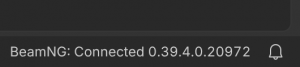
3. In VS Code, the JBeam Editor status bar should show "BeamNG: Connected"
Wie installiere ich diesen Mod in BeamNG.drive?
- Lade die Toolchain Server Loader.zip.
-
Verschiebe die .zip-Datei unverändert in deinen BeamNG Mods-Ordner:
- Starte BeamNG.drive – der Mod ist sofort im Fahrzeugmenü oder Repository aktiv!
Dateiname:
Toolchain Server Loader.zip
Dateigröße:
22.4 KB
Erstellt von:
@BeamNG Community
Downloads:
0
Likes:
0
Hinzugefügt am:
2.9.2026
100% virengeprüfter & kostenloser Direkt-Download
Ähnliche Mods aus Tuning


1 / 1