Vollbild ansehen
Vehicles
v1.2
BeamNG v0.39
Roadwave — In-Car Music Player with 3D Audio
Mod Created by:
@abrarsl
Hinzugefügt:
2h ago
Your music on a screen in the cabin, coming from the car itself.
mod_description
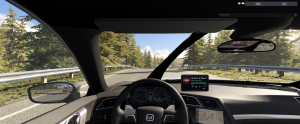
Roadwave puts a music player in the car you are driving. It is a screen in the cabin, placed and sized where you want it, playing files you already have on your disk.
The sound comes from the car, not from you. Look left and the music is on your left. Get out and walk away and it stays behind you, going quieter and duller with distance the way music from a parked car actually does. Nothing is built into any vehicle, so it works in every car in the game, modded ones included.
No music ships with this mod. You point it at a folder of your own files. Nothing is uploaded, copied or shared.
Setting up your music - about a minute
This is the only part that needs doing, so it is first.
1. Press Win + R, paste this, press enter:
%LOCALAPPDATA%\BeamNG\BeamNG.drive\current\mods
2. In there, make folders until you have this exact path. Some may already exist - use them if so:
mods\unpacked\rw_music\rw_music\
Yes, rw_music twice. That is not a typo. The game mounts the contents of the outer folder, so the inner one is the path the mod looks in. Your music lives here rather than inside the mod, which is why updating Roadwave can never touch your library.
3. Inside that inner rw_music, make a folder named after your playlist and drop your music in. The folder name becomes the playlist name:
mods\unpacked\rw_music\rw_music\Night Drive\
Any filenames work. mp3, ogg, wav and flac. Tracks play in alphabetical order by filename. A cover.jpg in the folder becomes its cover art.
4. Restart the game once. This is the step that catches everyone. The game only looks for new folders under mods\unpacked while it is starting up, so a folder you made mid-session stays invisible however many times you press Rescan. It is a one-off - after that, Rescan alone picks up anything you add, rename or delete, with the game running.
Then open the apps: pause menu > HUD Apps > Search Roadwave Player and Roadwave Browser, under Dashboard and General.
Already have a big music library? Do not copy it
Point at it instead. A folder junction inside rw_music works and the game cannot tell the difference - nothing is duplicated on disk, and files you add to the real folder show up with Rescan. In PowerShell, on one line, with your own two paths:
New-Item -ItemType Junction -Path C:\Users\YOU\AppData\Local\BeamNG\BeamNG.drive\current\mods\unpacked\rw_music\rw_music\MyMusic -Target D:\Music
Put your own Windows account name where YOU is, and your own music folder where D:\Music is. If either path has a space in it, wrap that path in double quotes.
Restart the game once afterwards, the same as for any new playlist folder. No admin rights needed. Deleting the junction later never touches your music. It has to point at a drive in your own PC - a network folder will not work.
What you get
A player in the cabin, wherever you want it. Drag it to move, scroll to resize, Shift + scroll to push it further into the dash. Middle of the console, top corner of the windscreen, over on the passenger side - it is your choice, and each vehicle remembers its own. Or leave it off and use the HUD app instead.
3D positional audio. Full volume within two metres of the wheel, a tenth as loud twenty metres away, still falling past a hundred. One button turns it flat if you prefer.
Muffled from outside. Step out of the cabin and the music goes dull as well as quieter, the way it sounds from the pavement. There is a switch for it.
Two HUD apps. A compact player for the corner of your screen, and a browser for picking a playlist and a track.
Playlists from folders. Add a folder, press Rescan, it is there.
Shuffle, repeat all, repeat one, and one volume shared by all three surfaces.
Seven bindable controls, so you never have to open a menu while driving.
mp3, ogg, wav and flac.
Controls
All seven are in Options > Controls; type roadwave in the search box. Shipped defaults:
Action Keyboard
Play / pause Shift + M
Next track Shift + .
Previous track Shift + ,
Volume up Shift + Numpad +
Volume down Shift + Numpad -
Next playlist Shift + B
Previous playlist Shift + V
Every one is rebindable.
The controls screenshot above shows a remapped setup, not the defaults.
The in-car screen is placed with the mouse, and only from the cockpit camera. Once it is where you want it, click the gear on it to lock the placement so a stray scroll cannot move it; double-click resets it for that vehicle.
Optional: nicer names and a set order
None of this is required - files play whatever they are called. But if you want the artist shown and the tracks in a specific order:
Filename Reads as
----------------------------- --------------------------
01 - Metallica - One.mp3 Metallica - One, track 1
Metallica - One.mp3 Metallica - One
07. Kashmir.mp3 Kashmir, track 7
One.mp3 One
The separator is a hyphen with spaces around it, so AC-DC and Jean-Michel Jarre survive intact. Number with a leading zero - 02, not 2 - or track 10 sorts before track 2.
Known limits
No track times on a plain folder of files. The mod reads no tags, so everything it shows comes from the filenames. Titles, artists and running order it can get that way; a track's length it cannot.
No m4a or aac. The game's browser does not carry those codecs, and that is not something the mod can change.
The cabin screen needs the interior camera. From a chase or orbit camera there is no cabin to draw it in - use the HUD app there.
Not tested with BeamMP.
Built and tested against BeamNG.drive 0.39.
Tell me what is wrong with it
I would rather hear about a problem than have you quietly uninstall it. Post in the discussion thread - bugs, things that felt awkward, features you expected to find and did not. I read all of it, and the list of what to build next comes from there rather than from my own ideas about what you want. Everything in 1.1 came from this page.
If something breaks, three things make it fixable in one reply instead of five:
What you were driving, and whether it was the cabin screen or the HUD app
What you did, and what happened instead of what you expected
The log, at %LOCALAPPDATA%\BeamNG\BeamNG.drive\current\beamng.log - attach it, or paste the lines that mention rw_
No feature request is too small. "The volume steps are too coarse" is exactly the kind of thing that never occurs to the person who wrote it.
Poppins by Indian Type Foundry and Jonny Pinhorn, used under the SIL Open Font License; the licence ships in the mod.
Not affiliated with or endorsed by BeamNG GmbH.
How to install this mod in BeamNG.drive
- Download the Roadwave — In-Car Music Player with 3D Audio.zip.
-
Move the unmodified .zip file into your BeamNG mods folder:
- Launch BeamNG.drive – the mod will appear in your vehicle selector or repository!
File Name:
Roadwave — In-Car Music Player with 3D Audio.zip
File Size:
8.9 MB
Created by:
@abrarsl
downloads:
0
Likes:
0
Added On:
8/27/2026
100% Virus-Checked & Free Direct Download
Related Mods in Vehicles
2022 Procyon Vela
A more refined take on the small roadster. Requires the Hirochi CCF.

Gavril Vertex NA2Rework
Completely reworked. The most customizable vehicle in the game! 106 configs and 1300 parts to choose
2020 Hirochi CCF Rework
The ground-up rework of a small roadster with big ambitions. Includes a functional screen & a V8!
1 / 1