Vollbild ansehen
Tuning
v2.11.11
BeamNG v0.39
Ghost Racer Enhanced
Mod Created by:
@hooncartel
Hinzugefügt:
2h ago
Ghost Racer Enhanced is a lap ghost, live comparison, and practice mod for BeamNG.drive. It records
mod_description
Ghost Racer Enhanced
Ghost Racer Enhanced is a lap ghost, live comparison, and practice mod for BeamNG.drive. It records your driving line and lap time so you can race your previous runs, see where time is gained or lost, and learn a faster line.
It is designed for circuit practice, free-roam loops, Hotlapping, and Time Trials. A Ghost is a lightweight visual replay rather than a second physical vehicle, so it does not participate in collisions or BeamNG's soft-body simulation.
This project is an enhanced version of Ghost Racer Replay 1.6 by Jesus Goose. Please visit the original BeamNG Resources page and BeamNG forum release/discussion thread. Many thanks to the original author for providing the foundation for this project.
Galleries
Ghost car chase view
Ghost replay
Mini UI
UI autolap
UI ghost display
UI config
Highlights
Place a directed start/finish gate in free roam and record consecutive laps automatically.
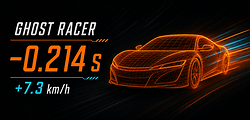
Compare live time delta Δt and speed delta Δv at the same point on the route.
Store up to 20 laps and display the best lap, Top N, one specified lap, selected laps, or every Ghost.
Color Ghost trails by absolute speed or by acceleration and braking.
Display a full best-lap racing line, route ribbon, and generated checkpoints.
Switch between the driving camera and Ghost Chase / Onboard views.
Save and name multiple starts, then restore them after changing vehicles or restarting the game.
Share PBs and Ghosts between vehicles at the same saved start while retaining the source vehicle for every lap.
Integrate automatically with BeamNG Hotlapping and Time Trials. (WIP)
Use either the full HUD or a compact circular race display.
Installation
Disable the original Ghost Racer Replay if it is installed. The original and enhanced versions cannot be enabled together.
Remove or move older ghost-racer-enhanced-*.zip files so multiple versions do not overwrite one another.
Copy dist/ghost-racer-enhanced-2.9.9.zip into the mods folder in your BeamNG user directory.
Enter a map, open UI Apps, and add Ghost Racer Enhanced.
After replacing the ZIP, you can usually press Ctrl+L to reload Lua and then F5 to refresh the UI instead of restarting immediately. The UI and Controller versions shown in the HUD title should match.
Your first lap
Automatic free-roam laps
Stop where you want the start/finish gate and point the car in the normal lap direction.
Click Set & start lap.
Lap 1 begins recording immediately. There is no Ghost yet because no completed reference exists.
Drive a full lap and cross the start in the correct direction to save Lap 1.
Lap 2 starts automatically and the newly completed Ghost launches with it.
When you return to the map, choose the previous location from Saved Start. A start with existing Ghosts becomes armed, and the next valid crossing begins recording and playback.
Manual recording
When automatic laps are not needed, click Record to start or stop a recording, then use Play ghost to replay it manually. This is useful for short routes, drift lines, and open roads that do not form a loop.
Ghost display modes
Dynamic best: always display the fastest available lap.
Top N ghosts: display the fastest 2, 3, 5, or 10 laps together.
Specified ghost: display one chosen lap.
Selected ghosts: display several manually selected laps.
All ghosts: display every stored lap; consider lowering quality when many Ghosts are visible.
Use VIEW on a lap row to follow that Ghost, then click DRIVER VIEW to return to the player vehicle. A Ghost is not a physical vehicle, so it cannot be selected with Tab.
Racing lines and trails
The following options are available in Settings:
Show ghost trail: display a short telemetry trail behind each visible Ghost.
Show best lap racing line: display the complete best-lap line.
Absolute speed: color the line by speed.
Acceleration / braking: color acceleration, steady speed, and braking separately.
Automatic route guide: build a route ribbon and checkpoints from the reference lap.
The route guide tries to follow mapped roads. Custom circuits and areas without navigation-road data may fall back to the original Ghost path. This does not affect recording, lap detection, or playback.
Saved starts and vehicle changes
Saved starts belong to the map rather than one vehicle. Changing cars keeps the start, PB, and Ghost library available, and every lap shows which vehicle originally recorded it.
When upgrading from an older release, activating a saved start automatically merges records that were previously stored in separate vehicle folders. The old files remain as recovery copies, and repeated vehicle changes do not import the same lap again.
Saved starts can be renamed, deactivated, or permanently deleted. Permanent deletion requires pressing DEL and then CONFIRM within the confirmation window to protect the entire lap library from accidental removal.
Frequently asked questions
Why is there no Ghost on Lap 1?
A Ghost must come from a completed lap. The first lap after creating a start records the reference, and it appears automatically when Lap 2 begins.
Why was my finish crossing not counted?
Check that you crossed in the correct direction and between the start-gate pillars. Very short laps, reverse crossings, vehicle resets, and teleport-sized position jumps are rejected. The HUD and BeamNG notice explain the rejection reason.
Why does the generated route not follow the road center?
Road matching depends on navigation data supplied by the map. Mesh circuits, off-road surfaces, and some custom maps do not provide that data, so the guide uses the recorded Ghost path instead.
Why does a Ghost look different from the vehicle that recorded it?
For a cross-vehicle replay, position and timing come from the original lap, while the wireframe uses the active vehicle's compatible structure.
Why is the UI still present after disabling the mod?
Disable or remove the mod through BeamNG's Mod Manager. Ghost Racer removes its saved layout entry when the UI reloads. After enabling it again, add the app from UI Apps once more.
Compatibility and limitations
Currently developed for BeamNG.drive 0.39.
Reads legacy Ghost Racer Replay 1.2 and 1.6 recordings.
Legacy files do not contain speed telemetry, so some line data may be unavailable.
Ghosts do not reproduce suspension movement, body deformation, or collisions.
Crossings, overpasses, and branching routes can occasionally confuse live route-position matching for a moment.
AI-assisted development disclosure
Development of Ghost Racer Enhanced—including feature work, refactoring, tests, and documentation—was assisted by OpenAI Codex using GPT-5.6 Sol at xhigh reasoning effort. AI assistance included analyzing existing code, proposing implementations, generating and editing code, helping diagnose issues, extending tests, and drafting documentation.
Project author flintt supplied the requirements, selected design decisions, reviewed and accepted changes, performed in-game validation, and remains responsible for the content included in each release. The AI service is disclosed as a development tool and is not credited as a project author or copyright owner.
Credits
Ghost Racer Enhanced is a community enhancement of Ghost Racer Replay:
Ghost Racer Replay — BeamNG Resources
Ghost Racer Replay — BeamNG Forums
How to install this mod in BeamNG.drive
- Download the Ghost Racer Enhanced.zip.
-
Move the unmodified .zip file into your BeamNG mods folder:
- Launch BeamNG.drive – the mod will appear in your vehicle selector or repository!
File Name:
Ghost Racer Enhanced.zip
File Size:
2.5 MB
Created by:
@hooncartel
downloads:
0
Likes:
0
Added On:
8/27/2026
100% Virus-Checked & Free Direct Download
Related Mods in Tuning
1 / 1