Vollbild ansehen
Tuning
v3.0
BeamNG v0.02
Experimental Mouse Steering Wheel - Drag to Steer
Mod erstellt von:
@BeamNG Community
Hinzugefügt:
Vor wenigen Minuten
Drag the on-screen steering wheel with your left or right mouse button to steer.
mod_description
After extensive debugging, I have managed to finalize a solid mod. Since the steering lock angle is read directly from the Jbeam, there is a possibility of desynchronization between the physical steering lock and the UI (though I haven't personally experienced this issue). If this version doesn't meet your expectations, you are welcome to try my earlier mods or uninstall it entirely:
https://www.beamng.com/resources/mouse-steering-wheel-drag-to-steer.38949/
Because it is quite different from the previous version, I am releasing this version as a new post.
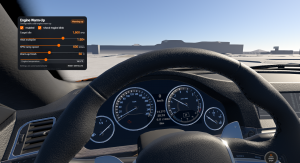
Click and hold the on-screen steering wheel with your left or right mouse button, then drag to rotate it. Your UI wheel's rotation is applied in real time to the steering wheel of the vehicle you're driving — release the mouse and it auto-centers.
While your cursor is over the steering wheel ui(or you're already dragging it), scroll forward to drop to neutral, then scroll backward to shift up; scroll backward to neutral, then forward to shift down.
White & blue modes merged The separate "no-return mode" toggle is gone. On release the wheel now decides automatically:
In the center zone (±0.02) → auto-centers
Anywhere else → holds its position
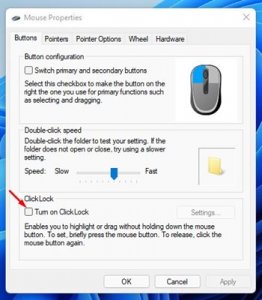
Tips:Tired of holding the button? Try Windows "Click Lock"!
Open Windows Settings → Mouse
Click "Additional mouse options"
Check "Turn on Click Lock (T)" (optionally adjust the hold-duration in "Settings")
Once on: hold briefly → release → the mouse stays locked-drag; move anywhere (even off the UI) and the wheel keeps turning; click once to release
Lap-count color markers Solves "how many turns am I in and which way is it pointed?" once and for all. As you turn, the rim gets painted in real time by lap:
1st lap → blue
2nd lap → red (painted over the blue)
3rd lap → black (supports heavy trucks with 3-turn steering)
Wie installiere ich diesen Mod in BeamNG.drive?
- Lade die Experimental Mouse Steering Wheel - Drag to Steer.zip.
-
Verschiebe die .zip-Datei unverändert in deinen BeamNG Mods-Ordner:
- Starte BeamNG.drive – der Mod ist sofort im Fahrzeugmenü oder Repository aktiv!
Dateiname:
Experimental Mouse Steering Wheel - Drag to Steer.zip
Dateigröße:
401.7 KB
Erstellt von:
@BeamNG Community
Downloads:
0
Likes:
0
Hinzugefügt am:
1.9.2026
100% virengeprüfter & kostenloser Direkt-Download
Ähnliche Mods aus Tuning
1 / 1