Vollbild ansehen
Tuning
v1.0
BeamNG v0.6
Experimental Local Split-Screen
Mod erstellt von:
@BeamNG Community
Hinzugefügt:
Vor 1 Std.
Play BeamNG locally with 2–4 players in a single game instance
mod_description
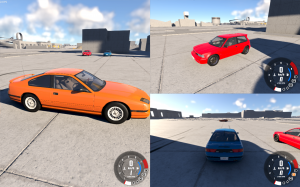
Play BeamNG together on one PC with up to 4 players.
Share the same Freeroam world with independent vehicles, cameras, controls and HUDs for every player.
Race, explore or crash together on the same screen!
Features
2 to 4 local players
Single BeamNG.drive instance
Separate keyboard/gamepad controls
Automatic split-screen layouts
Works in Freeroam
How to use
Install and enable the mod, then restart BeamNG.
Spawn at least one vehicle per player.
Press F6 or through Pause > Mods > Split-Screen and choose the number of players.
Assign a different input device to each player.
Click Start and and wait a few seconds.
Use F6 > Stop to return to normal gameplay.
Performance
Unlike multi-instance split-screen solutions, all players run inside a single BeamNG.drive process and share the same world and simulation. This significantly reduces the overhead of running multiple complete game instances.
Performance will still depend on the number of players, vehicles, map and graphics settings.
Experimental
This is an early release. Bugs, visual issues and crashes may occur.
The pause menu is currently shared between all players.
Opening the F6 settings temporarily switches to a single view so the menu can be used normally.
HDR is temporarily disabled while split-screen is active and restored when the session is stopped.
BeamNG's standard HUD system is designed around a single active player and cannot simply be duplicated across independent split-screen views. The per-player HUDs therefore use BeamNG's original visual assets with adapted data routing and rendering.
Currently in development
Performance improvements
Stability and compatibility fixes
HUD and interface refinements
Adding a border to better distinguish the separations between windows
UI/UX
Improve the recreation of HUDs and their functionalities
Controller and input improvements
Rendered across multiple separate physical screens
Feedback
If you encounter a bug, please provide as much information as possible. Contact me via private message before leaving a review to report a bug, make suggestions, or ask questions.
I'll be happy to help!
Wie installiere ich diesen Mod in BeamNG.drive?
- Lade die Experimental Local Split-Screen.zip.
-
Verschiebe die .zip-Datei unverändert in deinen BeamNG Mods-Ordner:
- Starte BeamNG.drive – der Mod ist sofort im Fahrzeugmenü oder Repository aktiv!
Dateiname:
Experimental Local Split-Screen.zip
Dateigröße:
4.5 MB
Erstellt von:
@BeamNG Community
Downloads:
0
Likes:
0
Hinzugefügt am:
31.8.2026
100% virengeprüfter & kostenloser Direkt-Download
Ähnliche Mods aus Tuning

1 / 1