Vollbild ansehen
Tuning
v0.8
BeamNG v0.2
Beta Buber
Mod erstellt von:
@Chudy_Pjoter
Hinzugefügt:
Vor 1 Std.
The Uber App for BeamNG.Drive Career Mode
mod_description
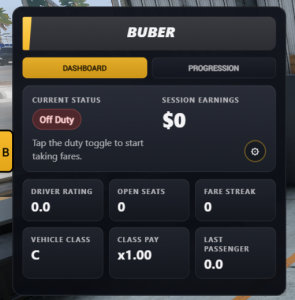
BUBER adds a Career Mode taxi and ride-share service to BeamNG.drive. Go on duty, accept fares, pick up passengers, complete trips, earn Career money, and build your driver rating to unlock bigger jobs.
Features
- Career Mode taxi jobs with pickup and drop-off routing.
- BUBER UI app with a dashboard, progression view, fare popup, and live taxi meter.
- Direct point-to-point fares for normal vehicles.
- Shared rides with multiple drop-offs after progression unlocks.
- Bus route jobs for high-capacity vehicles on maps with bus route data.
- Passenger types with different expectations, tips, and rating behavior.
- Driver rating progression from 0.0 to 5.0.
- Rating-based seat limits, payout limits, and route unlocks.
- Vehicle class pay multipliers based on vehicle performance.
- Fare streak bonuses for completing jobs back to back.
- Pickup, drop-off, boarding, and route guidance in the UI.
- Return-to-vehicle grace timer after passengers are onboard.
- Customizable UI size, opacity, popup position, meter position, and meter visibility.
- Saved UI settings and saved driver rating per Career save.
How To Play?
1. Enter a valid personal vehicle in Career Mode.
2. Open the BUBER UI app, or press `T` to toggle the overlay.
3. Press the duty button to go `On Duty`.
4. Wait for dispatch to offer a fare.
5. Accept or reject the fare from the popup or dashboard.
6. Follow the route to the pickup point.
7. Stop in the marked zone and wait for passenger service to finish.
8. Drive to the destination or next stop and complete the fare.
For shared rides and bus routes, follow each stop in order. Bus route jobs may ask you to stop, open the doors, wait for boarding or drop-off, then close the doors before continuing.
Passenger Types
BUBER includes several passenger groups. Each one rewards a different driving style:
Standard - Balanced speed, comfort, and efficiency.
Commuter - Punctual, steady driving.
Business - Fast, efficient trips with fewer delays.
Executive - Smooth, premium service.
Family - Safe, calm driving with enough seats.
Luxury - Comfort and smoothness over outright speed.
Party Group - Larger groups that still expect safe driving.
Student - Budget fares with simple efficiency bonuses.
Thrill Seeker - Speed and excitement without getting too reckless.
Tourist - Slower, smoother, scenic-style driving.
Driver Rating And Progression
Your driver rating is saved in your Career save and controls what BUBER will offer you.
Completing fares improves your rating based on passenger satisfaction. Abandoning a fare after passengers are onboard lowers it.
Progression unlocks higher seat limits, better earning potential, shared rides, and bus routes.
0.0 - Direct fares and up to 4 usable passenger seats.
1.0 - Better direct fares and up to 8 usable passenger seats.
2.0 - Shared rides, bus routes, and up to 18 usable passenger seats.
3.0 - Larger route work and up to 35 usable passenger seats.
4.0 - High-capacity fares and up to 65 usable passenger seats.
5.0 - Full vehicle passenger capacity.
The in-game Progression tab shows your exact current limits and next unlock.
Payouts
Fare pay is based on distance, passenger count, passenger type, tips, fare streak, vehicle class, and your driver rating. Bigger or faster vehicles can earn more, but BUBER keeps rewards balanced through progression so early jobs stay reasonable.
Vehicle And Route Notes
BUBER is made for BeamNG.drive Career Mode.
You need to be in a valid personal vehicle to take fares.
Loaned vehicles, walking mode, or Career challenges that disable taxi income can make BUBER unavailable.
Your vehicle's real seat count matters, but your driver rating controls how many seats BUBER will use.
Bus route jobs need a high-capacity vehicle and a level with usable bus stops and route data.
If you leave the vehicle before pickup, the fare is cancelled.
If you leave after passengers are onboard, you get a short timer to return before the fare is abandoned.
UI Tips
Use the yellow `B` tab to open or close the BUBER panel.
Press `T` to toggle the BUBER overlay.
Open the gear menu to adjust panel size, opacity, popup location, meter location, and meter visibility.
Move the UI app in BeamNG.drive's UI editor to dock it near a different screen edge.
Any issues you can join the discord or on the Github
.
Wie installiere ich diesen Mod in BeamNG.drive?
- Lade die Beta Buber.zip.
-
Verschiebe die .zip-Datei unverändert in deinen BeamNG Mods-Ordner:
- Starte BeamNG.drive – der Mod ist sofort im Fahrzeugmenü oder Repository aktiv!
Dateiname:
Beta Buber.zip
Dateigröße:
420.2 KB
Erstellt von:
@Chudy_Pjoter
Downloads:
0
Likes:
0
Hinzugefügt am:
1.9.2026
100% virengeprüfter & kostenloser Direkt-Download
Ähnliche Mods aus Tuning

1 / 1