Vollbild ansehen
Tuning
vv1.0
BeamNG v0.1
@BeamNG Community
51m ago
Advanced Pedal Button Input
Smoother, more progressive clutch, throttle and brake control for digital inputs.
mod_description
ADVANCED PEDAL BUTTON INPUT
Smoother, more progressive pedal control for digital inputs.
────────────────────────────────────────
OVERVIEW
Advanced Pedal Button Input (APBI) is a lightweight input-tuning mod that makes digital clutch, throttle and brake controls feel more progressive and controllable.
Keyboard keys and controller buttons(like the shoulder button for clutch) are normally binary: fully pressed or fully released. APBI keeps those controls digital, but changes how each button press is translated into pedal movement. This gives you finer control over launches, throttle application, braking and clutch engagement.
APBI is designed for keyboard players and for controller users who operate one or more pedals with buttons. It does not try to replace a proper wheel-and-pedal setup.
The mod also adapts to the fact that different gears need different pedal behavior. First gear usually benefits from softer throttle application and slower clutch release, while higher gears can respond much faster without feeling harsh. This helps the car feel more natural across normal situations such as parking, hill starts, city driving, overtaking, and relaxed highway cruising.
At a glance:
• Progressive digital clutch, throttle and brake response
• Gear-dependent throttle and clutch tuning
• Three-stage progressive braking
• Dedicated controller clutch-button support
• Built-in and custom profiles
• Independent enable/disable control for each pedal system
• True analog axes remain untouched
────────────────────────────────────────
QUICK START
• Subscribe to the mod normally.
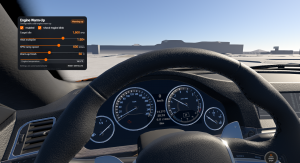
• Open Edit UI Apps and add Advanced Pedal Button Input.
• Begin with the built-in relaxing profile.
• Drive for a while before changing several values at once.
• Tune clutch, throttle and brake behavior to your preference.
• Save the result as a custom profile if you want to keep it.
• Everything can be tuned live in-game, and each pedal system can be enabled independently.
────────────────────────────────────────
MAIN FEATURES
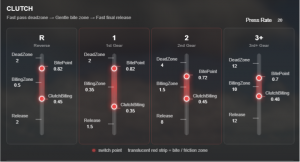
CLUTCH
• Progressive clutch engagement and release
• Separate tuning for reverse, neutral, 1st, 2nd, 3rd and higher gears
• Adjustable bite-zone behavior
• Adjustable release rates for different clutch stages
• Dedicated controller clutch-button support
A slower release through the bite region can make first-gear launches smoother. Second gear can release faster, while higher gears can use quicker behavior for normal shifting.
— First gear can use a slower bite-zone release while higher gears remain fast.
THROTTLE
• Progressive digital throttle response
• Separate tuning for reverse, neutral, 1st, 2nd, 3rd, 4th and higher gears
• Adjustable initial response, comfort target and full-rate behavior
• Adjustable throttle release rate
A softer first-gear response can make launches easier to control while higher gears remain quick and responsive.
— Throttle response can be tuned differently for each gear.
BRAKE
• Three-stage progressive braking
• Adjustable first and second target levels
• Adjustable rate for each braking stage
• Adjustable brake release rate
The three-stage design gives a digital brake key or button more usable modulation before full braking force. Its purpose is improved control—not a guaranteed reduction in stopping distance.
— Three-stage braking gives digital brake input a more progressive feel.
────────────────────────────────────────
CONTROLLER CLUTCH BUTTON
No extra binding is required. Use your existing controller clutch button normally(such as shoulder button), and APBI will automatically apply the configured clutch behavior.
────────────────────────────────────────
PROFILE SYSTEM
Profiles let you keep different pedal setups for different vehicles and driving styles.
• Save and load custom profiles
• Preview stored values before applying them
• Reset built-in default profiles in the settings menu
• Remember the last active profile
• Store all three master enable/disable states with each profile
Selecting a profile first displays its stored values in the UI. The profile is not applied to the vehicle until you press Ready to Load. After tuning, press Ready to Save to store the current setup.
────────────────────────────────────────
DIGITAL INPUT ONLY
APBI is specifically designed for digital input.
• Keyboard throttle, brake and clutch: supported
• Controller/gamepad buttons: supported
• True analog throttle, brake and clutch axes: intentionally bypassed
This design improves digital control without interfering with proper analog pedal hardware.
────────────────────────────────────────
COMPATIBILITY & NOTES
• Throttle and brake features work with both manual and automatic transmissions.
• The clutch section is intended mainly for manual-transmission use and can be left disabled with a conventional automatic gearbox.
• Gear-dependent behavior uses the current physical gear where applicable.
• Brake behavior is universal rather than gear-dependent.
• Each pedal system can be enabled or disabled independently.
Tip: Start with the relaxing profile and adjust one system at a time. Small changes are easier to evaluate than changing every value at once.
────────────────────────────────────────
VIDEO DEMONSTRATION
The planned demonstration covers stock versus APBI launches, throttle response, braking, manual clutch behavior and automatic-transmission use.
────────────────────────────────────────
FEEDBACK & BUG REPORTS
Feedback is welcome. If you encounter a problem, please include:
• BeamNG.drive version
• Vehicle and transmission type
• Input method: keyboard, controller button
• Enabled APBI sections
• Active profile
• What you expected and what actually happened
────────────────────────────────────────
DEVELOPMENT & CREDITS
Concept, behavior design, tuning, testing and UI decisions: Skyline Lee
Programming and debugging assistance: AI-assisted development using ChatGPT
AI was used extensively for programming assistance, debugging, code organization and investigation of BeamNG-specific behavior. The concept, target behavior, tuning and final design were developed through repeated in-game testing and iteration. The public build has been tested across vehicle changes and different driving situations.
Thanks to the BeamNG.drive community for its documentation, modding references and testing knowledge.
Drive, tune, and make digital inputs feel like your own.
How to install this mod in BeamNG.drive
- Download the Advanced Pedal Button Input.zip.
-
Move the unmodified .zip file into your BeamNG mods folder:
- Launch BeamNG.drive – the mod will appear in your vehicle selector or repository!
Sicherheitsprüfung bestanden
Keine Schadsoftware erkannt • Geprüft
File Name:
Advanced Pedal Button Input.zip
File Size:
360.1 KB
downloads:
0
Likes:
0
Added On:
9/7/2026
Related Mods in Tuning
1 / 1