
Vollbild ansehen
Tuning
v1.0
BeamNG v0.39
@BeamNG Community
34m ago
Beta Pessima interior RGB Light
PESSIMA ONLY! Glowing RGB tubes and real cabin lighting for the Pessima
mod_description
pessima Interior RGB Light
THE RGB COLOR PICK DOSENT WORK RIGHT NOW (W.I.P)
the build in colors works
This adds proper interior lighting to the Ibishu Pessima. Tubes run along the
headliner, down both sides from the roof rail to the footwells, across the top
of the doors, and along the base of the windscreen. They glow, and they throw
real light into the cabin, so at night the inside of the car is actually lit
instead of being a black hole.
The lights switch on and off with your underglow, so they are on the same key
you already use. If you have no underglow fitted they still work on their own.
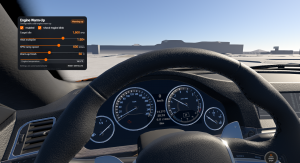
You can pick a colour from a list of seven, the same seven the game uses for
underglow, so White, Blue, Cyan, Green, Magenta, Red and Yellow. Choosing one
changes the light thrown into the cabin and the colour of the tubes themselves
at the same time. There is also a Custom option, which hands you red, green and
blue sliders so you can mix any colour you want.
Brightness is split into three sliders instead of one, because the roof, the
headliner glow and the dash tube all want different levels. Cabin Brightness is
the main one, Ceiling Glow is the soft wash on the headliner above you, and Dash
Brightness handles the tube at the base of the windscreen. All of them sit in
the parts menu next to the colour sliders.
You will find it in the parts menu under Roof Accessory, listed as Interior RGB
Light. It opens a Roof Accessory slot of its own underneath, so a roof scoop or
anything else you had fitted up there still goes on as normal.
Nothing else is required. It does not replace or modify any stock file, it uses
its own materials, and it will not interfere with underglow, with skins or with
other Pessima mods.
located at Roof Accessory
Installing manually
If you downloaded the zip from the website rather than through the in game
repository, do not unpack it. BeamNG loads mods as zip files.
Close the game first. Then open your file explorer and paste this into the
address bar
%LOCALAPPDATA%\BeamNG.drive
Open the folder for your game version, for example 0.39, and go into the mods
folder inside it. Drop the zip in there and close the window. If there is no
mods folder, make one and call it mods.
Start the game, open the vehicle configurator on a Pessima, and look under Roof
Accessory.
If it does not show up, check that the zip is still a zip and that it sits
directly inside the mods folder rather than in a folder of its own.
How to install this mod in BeamNG.drive
- Download the Beta Pessima interior RGB Light.zip.
-
Move the unmodified .zip file into your BeamNG mods folder:
- Launch BeamNG.drive – the mod will appear in your vehicle selector or repository!
Sicherheitsprüfung bestanden
Keine Schadsoftware erkannt • Geprüft
File Name:
Beta Pessima interior RGB Light.zip
File Size:
6 MB
downloads:
0
Likes:
0
Added On:
9/7/2026
Related Mods in Tuning
1 / 1