Vollbild ansehen
Tuning
v1.1
BeamNG v0.39+
AeroBench - Aerodynamics Test
Mod Created by:
@hooncartel
Hinzugefügt:
1h ago
Measure and compare vehicle aerodynamics with automated wind tests.
mod_description
Turn BeamNG into a virtual wind tunnel.
AeroBench is an advanced in-game aerodynamics testing tool for BeamNG.drive 0.39+, built to measure, analyze and compare how vehicles behave under controlled airflow.
Test everything from drag, downforce and aerodynamic balance to crosswind behavior, center of pressure, active aero and inter-vehicle aerodynamic effects.
Instead of relying only on driving tests, AeroBench can keep the vehicle stationary and apply controlled airflow at configurable speeds and yaw angles. It then uses BeamNG's native aerodynamic forces, moments, tire loads and wheel-contact data to automatically calculate and record the results.
Test a spoiler, wing, body modification or complete vehicle setup, save the result as a reference, make a change and immediately see its measured aerodynamic impact in BeamNG.
How does it work?
During automated tests, AeroBench keeps the vehicle stationary and applies controlled airflow using BeamNG's wind system.
Once each stage has stabilized, AeroBench samples BeamNG's aerodynamic forces, moments, tire loads and wheel contacts to calculate the results.
The Reference Area and vehicle reference dimensions are calculated automatically from the vehicle's aerodynamic geometry.
Compatible active aero systems receive the simulated airspeed, allowing features such as active spoilers to react naturally even while the vehicle remains stationary.
Aerodynamic Measurements
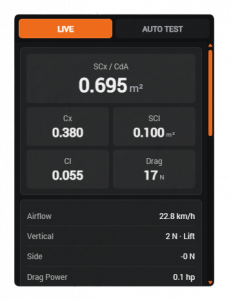
Live SCx / CdA, Cx, SCl and Cl measurements.
Drag, lift/downforce, side force and Drag Power.
Pitch, roll and yaw aerodynamic moments.
Reference Area, vehicle dimensions, CoP and CoG.
Front/rear aerodynamic balance and tire load analysis.
Crosswind and Wind-Axis aerodynamic analysis.
Active aero support.
Automated STRAIGHT, YAW, DRAFT and LIMIT tests.
BeamNG 0.39 Inter-Vehicle Aero with SLIP, BUMP and SIDE.
Effective Air and aerodynamic Δ measurements.
2D DRAFT interaction maps.
Slide, Wheel Lift and wheel-contact monitoring.
Graphs, detailed tables, references and copyable reports.
Metric and imperial units.
And more...
Live Mode
AeroBench can be used while driving to monitor the vehicle's aerodynamic behavior in real time without running an automated test. The values therefore change depending on your driving.
Auto Test Mode
Automated tests apply controlled wind conditions to the vehicle while it remains stationary, allowing more consistent and repeatable measurements.
Straight Test
Measures the vehicle across a configurable range of wind speeds to show how its aerodynamic behavior changes with speed.
Yaw / Crosswind Test
Tests multiple wind speeds and yaw angles to measure how the vehicle reacts to crosswinds.
Draft / Inter-Vehicle Aero Test
Uses BeamNG 0.39's Inter-Vehicle Aero system to measure how nearby vehicles affect the tested vehicle:
SLIP: simulates a vehicle ahead, reducing the airflow and drag in its wake.
BUMP: simulates a vehicle following behind, affecting the airflow around the rear of the tested vehicle.
SIDE: simulates a vehicle travelling alongside, measuring aerodynamic interaction from lateral proximity.
Available with LINEAR sampling for distance-based testing or SPATIAL sampling for position-based testing and 2D interaction maps.
Wind Limit Test
Gradually increases wind speed until the vehicle starts sliding or loses wheel contact, giving its last validated wind speed.
You can save test results as references and compare them with later configurations, which is useful for testing changes such as spoilers, wings, bodywork or other aerodynamic modifications.
Test Analysis
Each automated stage is allowed to stabilize before measurements are collected.
AeroBench monitors measurement stability, vehicle movement, wheel loads and ground contact. Invalid stages remain visible and clearly identified, but are excluded from calculations that require valid data.
Results can include graphs, detailed stage-by-stage data, 2D maps, reference comparisons and copyable reports.
Vehicle Support
Wheel positions and axle groups are detected automatically, including support for multi-axle vehicles, 3-wheel vehicles and unusual wheel layouts.
Tire load, wheel-contact and front/rear calculations adapt to the detected vehicle layout.
Active aero systems are also supported when their controllers respond correctly to the simulated test conditions.
Compatibility with modded vehicles may still vary depending on how their aerodynamics, wheel setup and active aero controllers are implemented.
How to add the UI to your HUD
Press Esc to open the game menu.
Open System menu.
Select HUD Apps.
On your current HUD layout, click Edit Layout.
Click Add App.
Search for AeroBench and add it to your layout.
Move and resize the app as needed, then exit the layout editor.
Documentation
For detailed explanations of AeroBench measurements, coefficients and terminology, see the public documentation.
Feedback
I have experience using CFD software such as Autodesk CFD, which helped me understand and design the aerodynamic measurements used in AeroBench.
If you are familiar with BeamNG's aerodynamics and notice an incorrect interpretation, compatibility issue or possible improvement, feel free to report it.
Suggestions for missing features or additional measurements are also welcome.
Changelog V1.1
Existing features reworked
Improved Straight, Yaw and Wind Limit test stability, sampling and stage validation.
Better detection of vehicle movement, wheel contact loss and unstable measurements.
Improved support for active aero systems and unusual wheel layouts, including multi-axle and 3-wheel vehicles.
Expanded result tables, curves and reference comparisons with additional aerodynamic, tire-load and moment data.
Reworked result-stage selection and standardized terminology throughout the UI.
Improved reports, UI readability and overall performance.
BeamNG 0.39 features integrated
Added inter-vehicle aerodynamics testing using BeamNG 0.39 interAero.
Added three interaction types: SLIP, BUMP and SIDE.
Added LINEAR and SPATIAL sampling.
Added local free-stream baseline measurements between stages for more reliable DRAFT results.
Added DRAFT reliability evaluation and stage validation.
Added 2D interaction maps showing aerodynamic changes around the vehicle.
New additions
New DRAFT Auto Test mode.
New DRAFT metrics including Effective Air, Drag Δ, Vertical Δ, front/rear aero changes and effective road coefficients.
DRAFT reference saving and comparison for SLIP, BUMP and SIDE independently.
More detailed CoP/CoG, front/rear load and tire-load analysis.
Improved manual result browsing for individual test stages.
More complete copyable reports for every test mode.
How to install this mod in BeamNG.drive
- Download the AeroBench - Aerodynamics Test.zip.
-
Move the unmodified .zip file into your BeamNG mods folder:
- Launch BeamNG.drive – the mod will appear in your vehicle selector or repository!
File Name:
AeroBench - Aerodynamics Test.zip
File Size:
355.4 KB
Created by:
@hooncartel
downloads:
0
Likes:
0
Added On:
8/27/2026
100% Virus-Checked & Free Direct Download
Related Mods in Tuning
1 / 1